
Part 1
- In Adobe Dreamweaver, open up the index.html file you created in the previous lesson task. If you do not have one, then create a new document now.
- Ensure the HTML file is saved as index.html in the folder structure you created for the lesson task on planning the structure. Note that the tile of the page can be different from the file’s name. You always need to name at least one file index.html, as a browser will look for such a file to load first. It does not have to be your home page, but this is standard practice.
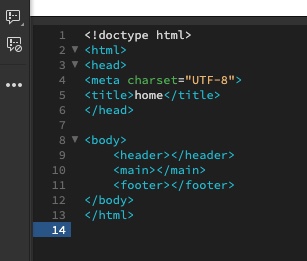
- Now, start adding some tags. It is perfectly fine if you don’t add any information between the opening and closing tags for now, just focus on the different tags that will make up the structure of the web page. Your HTML file should have the following content:
- <!DOCTYPE html> – this should be the first line in the document.
- <html>, <head> and <body> elements.
- Page title – note: the <title> element must sit within the <head> element.
- <header>, <main> and <footer> elements, these must sit within the <body> element.
Almost all of the elements you will use have opening and closing tags. Typical ‘newbie’ mistakes include forgetting to close your tags. Check your work!
Take a screenshot of the HTML-coded document to post to your blog.
Part 2
You have created an HTML document with the following content:
< !Doctype html> information for your browser , about what document to expect.
<html> stands for hypertext markup language , it defines the structure of a web page.
<head> the head tagg means data about data.
<body> defines the body of the hole structure, and it can only be one body.
<title> allowed to give the web page a title so you can find it in the browser or a search.
<header> a container of introductory content or a set of navigational links. A header is for headings from h1 to h6.
<main> specifies the main content of a document. It should be unique to the document.
<footer> is a structural element used to identify the foster of a webpage, document, article or section.
ref: html.com
 Graphic Design by Knut Olav
Leave a comment